Custom Discord Role Icons — Free, Without Nitro
Add emoji icons to member nicknames based on their roles — no server boosts required. Set up in under 10 minutes.
1 Add the Bot
Invite T4 to your server if you haven't already.
Invite T4 Bot2 Choose or Create a Role
Pick the role you want to display an icon for (e.g., VIP, Moderator, Artist). Create a new role in your server settings if needed.
3 Create the Icon Badge
Use /create and set the Nickname Emoji field to a Unicode emoji (e.g., 🌟, 🎮, 👑).
Important: Only Unicode emojis work — not custom server emojis. These are the emojis built into your operating system.
4 Assign to the Role
Run /give-to-role [badge] [role] and confirm with 👍. Every member with that role will get the icon in their nickname.
5 Done!
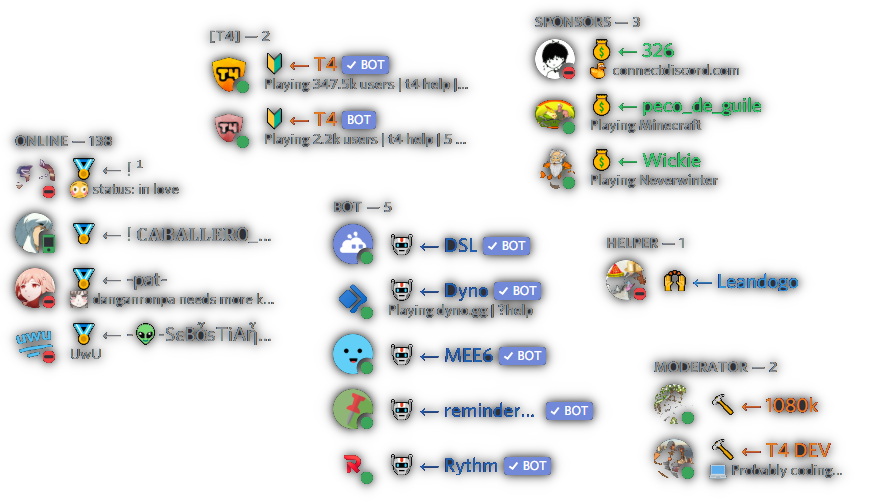
Every member with the role now has the emoji icon in their nickname. For example, every @VIP member gets 🌟.
New members who receive the role will automatically get the icon too.
Good to know
- Works on any server — no Level 2 boosts required.
- The bot can't change the server owner's nickname (Discord limitation).
- Discord has a limit of 250 roles per server. If you're running low, you can assign badges directly to members with
/giveinstead. - Use
/check-member-toolto diagnose any issues.
Running into issues?
See the Troubleshooting guide for fixes to common problems — role icons not showing, "the application did not respond", unexpected golden badges, and more.